
Estarivo Explore
Let buyers walk the estate before they visit it.
Interactive estate maps with live plot availability, 360° walkthroughs, supported 3D models and inspection requests, on your company's own property pages and connected to your sales records.
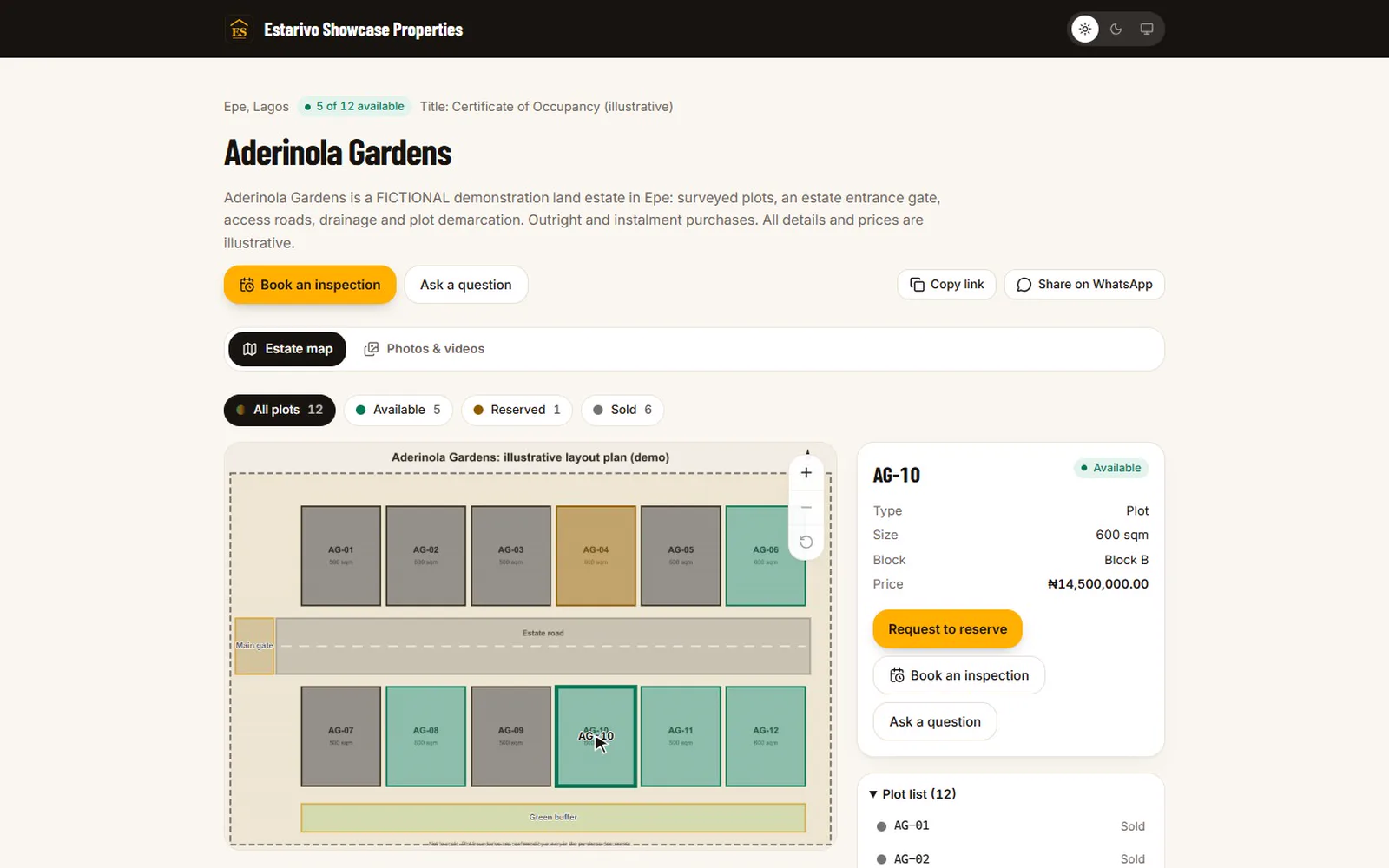
Recorded in Estarivo · demonstration company, fictional data · 18s · What it shows
- The estate layout, each plot coloured by live availability
- Choosing a plot shows its size, price and status
- A 360° tour the buyer can look around in
- Moving between rooms of the illustrative house tour

Why it matters
Many buyers decide from far away.
Diaspora buyers, buyers in another city and busy professionals often commit before they ever stand on the land. They want to see which plots are really available, where they sit, what is around them, and what the house would feel like inside.
A brochure PDF and a WhatsApp video can't answer “is plot 14 still free?”. An Estarivo Explore map can, because its colours come from the same inventory your sales team sells from.
Photo: Ben Iwara / Pexels. Illustrative; not an Estarivo customer project.
Available in Estarivo Explore
What buyers and your team can use today.
Clickable estate layoutsUpload the approved layout (image or PDF) and draw each plot once in the map editor.
Live plot availabilityPlots are coloured available, reserved or sold from your inventory, as it changes.
Plot detailsSize, price and status on click, with a list view for keyboard and screen-reader users.
Photos and videosA gallery per estate, with every image labelled for what it is.
360° walkthroughsPanoramas grouped into tours with rooms or viewpoints buyers move between.
3D modelsSupported architectural models (GLB) viewable in the browser, marked as concepts.
External tour providersEmbed reviewed Matterport, Kuula or 3DVista tours from their share links.
Inspection and reservation requestsBuyers ask to inspect in person or remotely, or ask to reserve; your team confirms.
Realtor attributionExplore pages shared through a realtor's link credit that realtor's enquiries.
A reservation request does not reserve a plot on its own: it creates a lead for your team, who confirm availability and terms before a reservation is made.
Where it appears
On your property pages, your portal and your realtors' links.
Each estate's Explore view can be public, for signed-in customers only, or switched off. It appears inside the estate's property page, in the customer portal and on pages realtors share, and it is set up from the estate record with a short checklist.
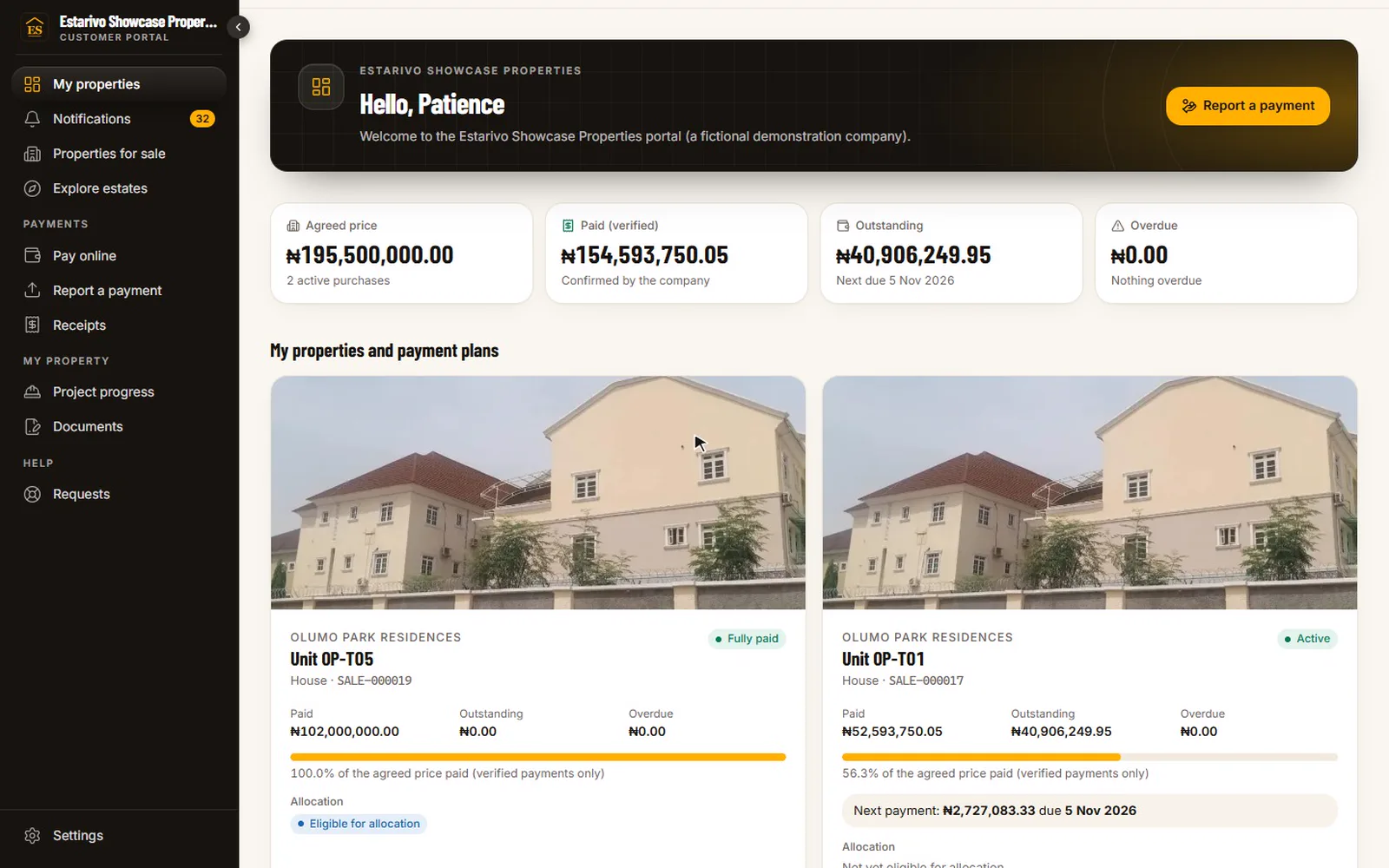
Recorded in Estarivo · demonstration company, fictional data · 14s · What it shows
- The buyer's home in the company's portal: property, balance and next payment
- Official receipts for every verified payment
- Construction progress updates published by the project team
Explore Labs: coming soon
What we're exploring next, and how to tell us you need it.
Inside Estarivo, companies using Explore can see the capabilities we are researching and request early access discussions. These are not part of the product today.
Coming soon (not available)
A request records interest; it does not switch anything on or commit to a date.
Questions
Questions about Explore
Does Estarivo support interactive estate maps and virtual tours?+
Yes. Estarivo Explore provides clickable estate layouts with live availability, 360° tours, supported 3D models, embedded tours from Matterport, Kuula and 3DVista, and inspection requests.
Do we need special equipment?+
No. A layout image or PDF is enough for the map. 360° photos from a consumer 360° camera, or tours you already host with a supported provider, can be added.
Is Explore included in every plan?+
Explore is an optional module that is switched on per company. We'll explain how it fits your plan during the demo.
Can renders be shown as the finished building?+
No. Concepts, renders and reference photographs are labelled as illustrations; only verified site reports are presented as progress.
One system
Connected to the rest of your company
- CRM & customer portals Requests from Explore become leads with their source.
- Realtors & incentives Realtors share Explore pages and are credited for enquiries.
- Development & construction The estate layout and inventory behind the map.
- Installments & collections Sold and reserved plots reflect real sales.
See an estate the way a buyer would.
We'll open a demonstration estate in Explore, choose a plot, walk through a 360° tour and show how it is set up from the estate record.